

EV: Adjusting the light intensity
When shooting a whitish overall image such as a backlit subject or a snowy scenes, the camera judges that the subject is bright and may set a darker exposure for the image. In such cases, adjustment of the exposure in the + (plus) direction is effective.
|
|
|
Adjust in the + direction |
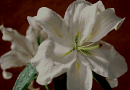

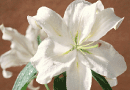
When shooting a darker overall image, the camera judges that the subject is dark and may set a brighter exposure for the image. In such cases, adjustment of the exposure in the - (minus) direction is effective.
|
|
|
Adjust in the - direction |

You can check the exposure referring to the histogram chart. Be careful not to overexpose or underexpose your subject (giving a whitish or darkish image).
EV: Adjusting the light intensity
Manually adjusts the exposure.
- Mode dial position:
 -
-  -
-  -
- 
- Press MENU to display the menu
- Select
 (EV) with
  on the control button.
 - Select the desired setting with
 , then press
  .
. - Press MENU to turn off the menu.
The menu items available vary depending on the mode dial position and settings. Only the available items are displayed on the screen.
-2.0 EV |
Toward –: Darkens an image. |
0 EV |
The exposure is determined automatically by the camera. |
+2.0 EV |
Toward +: Brightens an image. |
- The compensation value can be set in 1/3EV increments.
- If a subject is being shot in extremely bright or dark conditions, or the flash is used, the exposure adjustment may not be effective.
Basic techniques for better images
- Focusing on a subject successfully
Adjusting the light intensity
- On “image quality” and “image size”
- On the effects of lighting
- On using the flash
