

Windows Vista Driver Installation Procedure for NW-E50/E70/E90/S23/E99
To install the driver, please follow the steps below.
- Download SonicStage Ver.4.3, and install to
your computer.
Note: Log on with an Administrator user name. - Insert the CD-ROM supplied with the player into your
computer.
Wait until AutoPlay dialog box appears, and click X to close the box.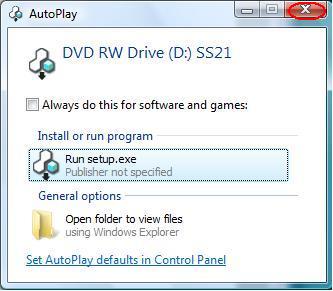
- Connect the Walkman to your computer.
Found New Hardware dialog box appears.
Click Locate and install driver software (recommended).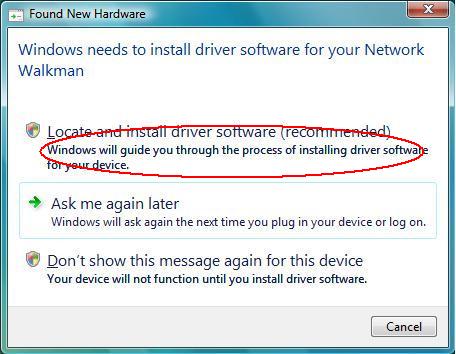
- The User Account Control dialog box appears. Click Continue to proceed.
- Found New Hardware dialog box appears. Because the disc is already inserted, click Next.
- The software
for this device has been successfully installed message
appears.
Click Close to complete the installation.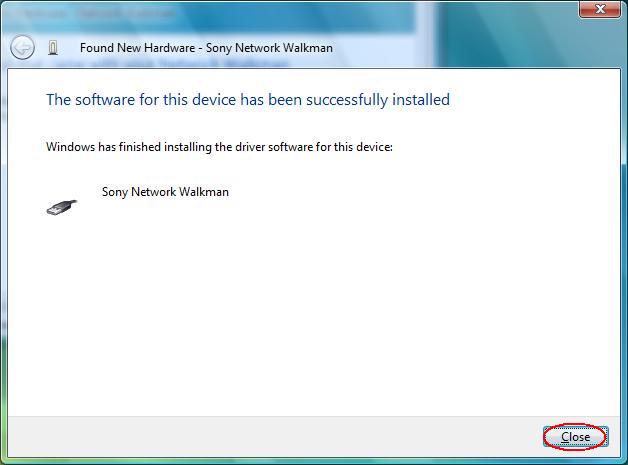
Last Updated 6 June 2007