If You Already Have an Account with An Applicable Sony Group Service, You Can Sign in By Entering Your Registered Email Address and Password. Applicable Sony Group Services in India PlayStation Network, Sony Picture Core, Home Entertainment & Sound Services, My Sony, Product Registration, Alpha Universe, Creators Cloud.
- A computer or smartphone that can connect to the Internet
- An email address that can receive HTML contents
- Email address
- Password
- Country/Region of residence
- Date of birth
- Language
- You may need to enter your name, gender, and address, depending on the service.
Please follow the guideline below when creating or changing the password associated with the account.
- Must not include 3 or more consecutive identical characters.
Example: 333 or BBB - Must not include 3 or more consecutive characters.
Example: 345 or ABC - Must be at least 8 characters.
- Must include at least 2 different types of characters (letters, numbers or symbols (!, @, #, &, etc.)).
- You cannot use the same string as your sign-in ID (email address).
You can create a new account by performing the steps below.
- Enter your country/region, language and date of birth, By selecting Agree and Continue button, you’re confirming that you’ve understood and accept the Terms of Service and the Privacy Policy.

- Enter your sign-in ID (email address), password, re-enter your password, first name, last name then selects Continue

- A confirmation email will be sent to the sign-in ID you created using your email address.
NOTE: If you do not receive the confirmation email, please check If you do not receive the verification email.

- Open the email sent to the created sign-in ID email address and enter the E-mail verification code.
Account creation is complete when the following message appears on screen: Your Sony account was successfully created.

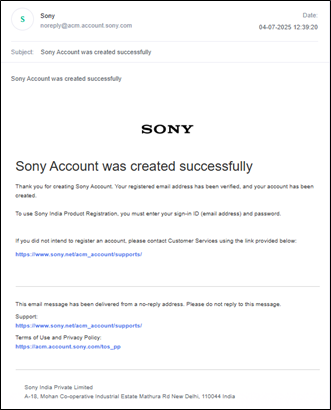
- An email notification will be sent to the email address you have used in your sign-in ID to complete account creation.
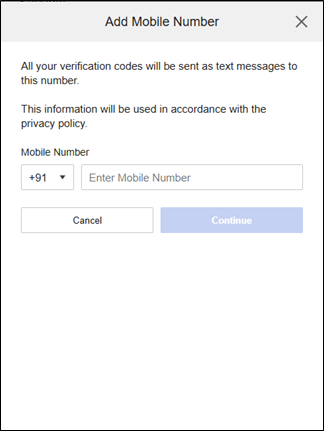
- Post Email Verification Please log in again and proceed to add your mobile number. Enter your mobile number and verify it using the OTP sent to your phone. Once the OTP is successfully entered, your mobile number will be added as shown in the image below.
- Choose the method, how would you like us to keep you updated with Sony news and exclusive offers?


